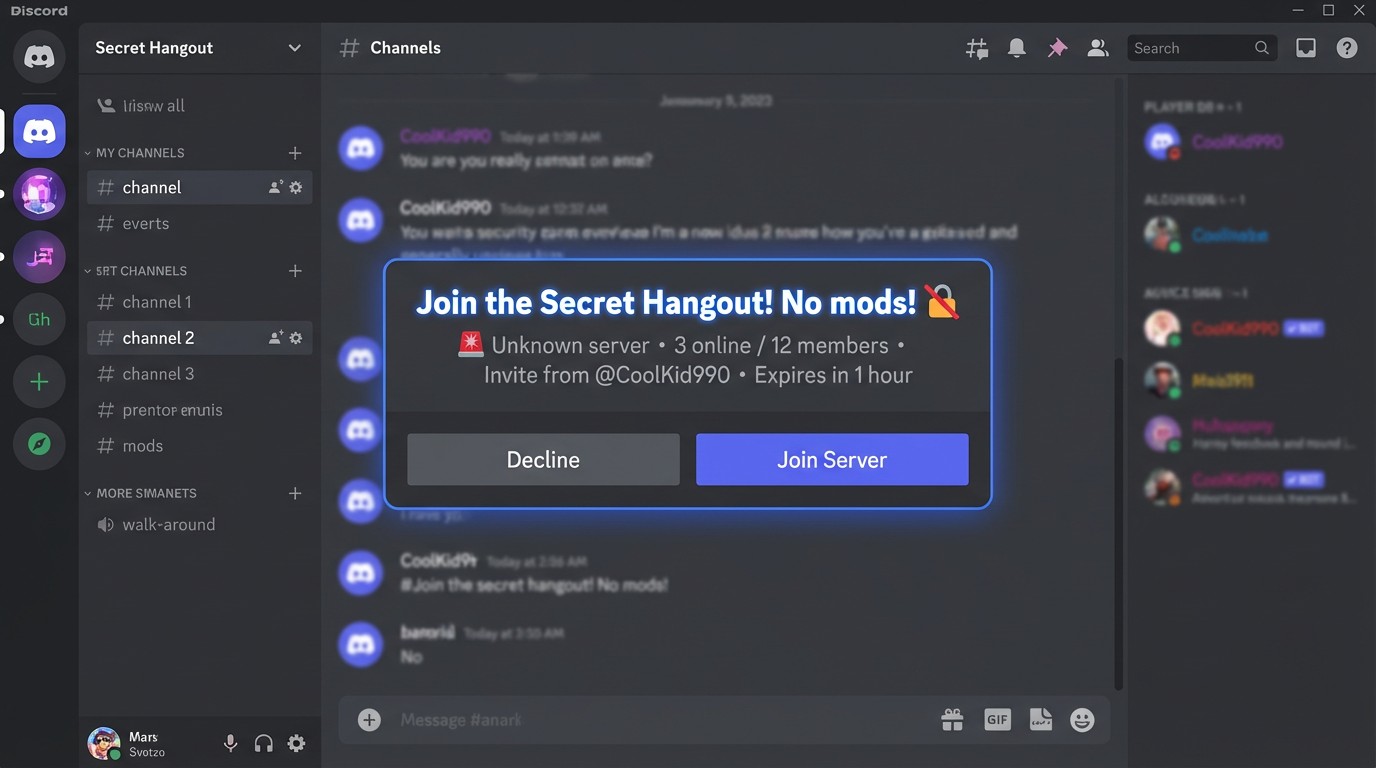
💡 "Secret" or "No Mods" usually means higher risk of unsafe content.
For Parents
Supervision is key▾
Ask who invited them, who moderates the server, and what the rules are.
Check settings together▾
Review device and platform privacy settings to limit who can contact your child.
Discuss "Secrets"▾
Explain that online spaces asking for secrecy often lack safety guards.
⚖️ The Law
Many platforms set 13+ minimum age requirements. Sharing harmful content or contacting minors inappropriately can violate platform rules and local child-safety laws.
Think Before You Click
"Secret" often means unsafe▾
Real friends don't need to hide where they hang out.
No mods = No guards▾
If there's nobody to enforce rules, anything can happen.
Ask before you join▾
Show a parent the invite. If it's safe, they'll say yes.
Level 2
Age Ratings
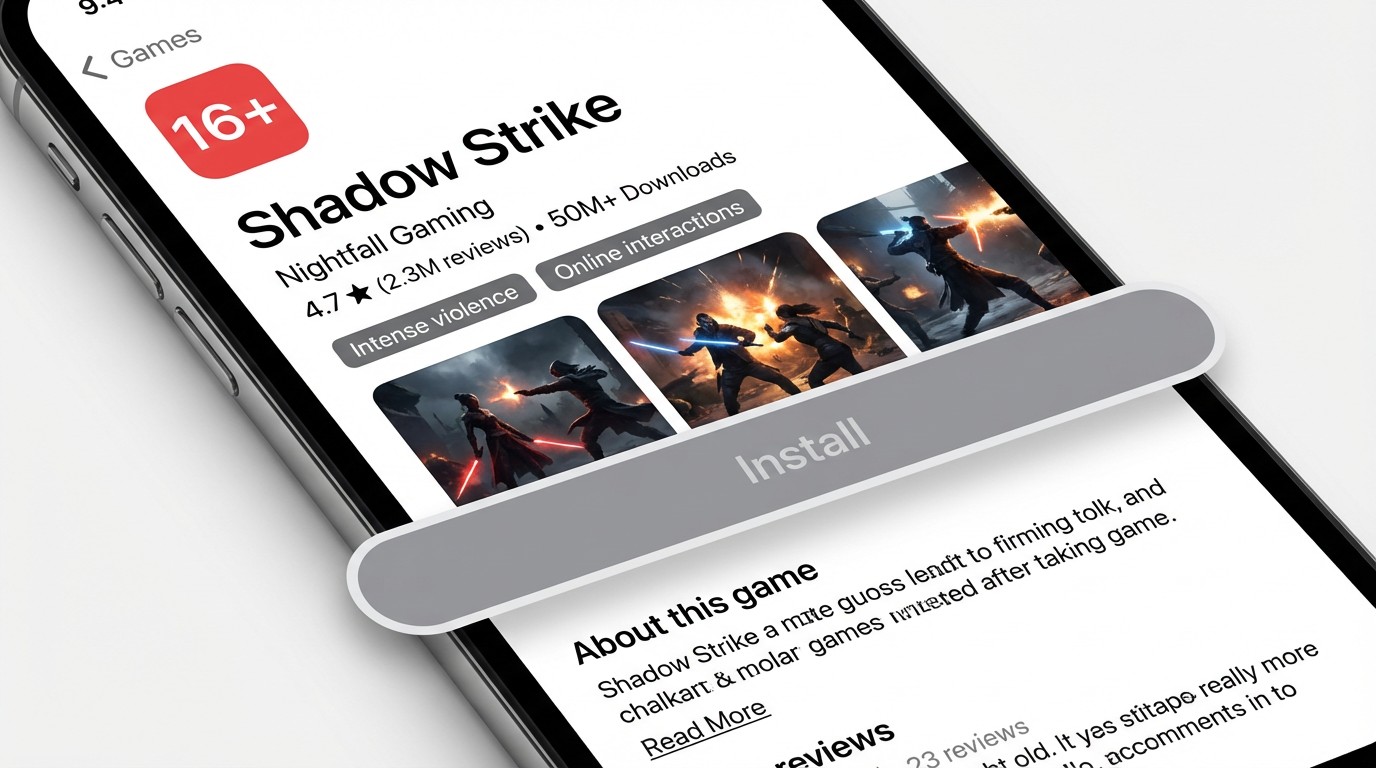
You found a cool new game called "Shadow Strike". It looks intense and exciting. But check the details before you install…
🔞
RESTRICTION
"16+" means mature content.
⚔️
CONTENT
Intense violence & online chat.
🎭
THEME
Dark, realistic combat visuals.
Level 2
Make Your Choice
What would you do?
Choose the safest option
💡 Ratings summarize content risk quickly. 16+ often means mature themes.
For Parents
Ratings summarize risks fast▾
They aren't just suggestions; they highlight violence, language, and interaction risks.
Model good choices▾
Show how you check ratings for movies or games you buy for yourself.
Set purchase limits▾
Configure devices to require approval for any app install or purchase.
⚖️ The Law
Stores and ratings bodies (like IARC, PEGI, ESRB) provide guidance to protect minors. Some regions restrict access to mature content for users under specific ages.
Think Before You Click
Fair play is fun play▾
Games for your age group are designed for your skill level.
Don't rush growing up▾
16+ games often have toxic chats that aren't fun to be in.
Ask first▾
If the store says 16+, check with a parent. They might say yes later.
Level 3
The Public Post
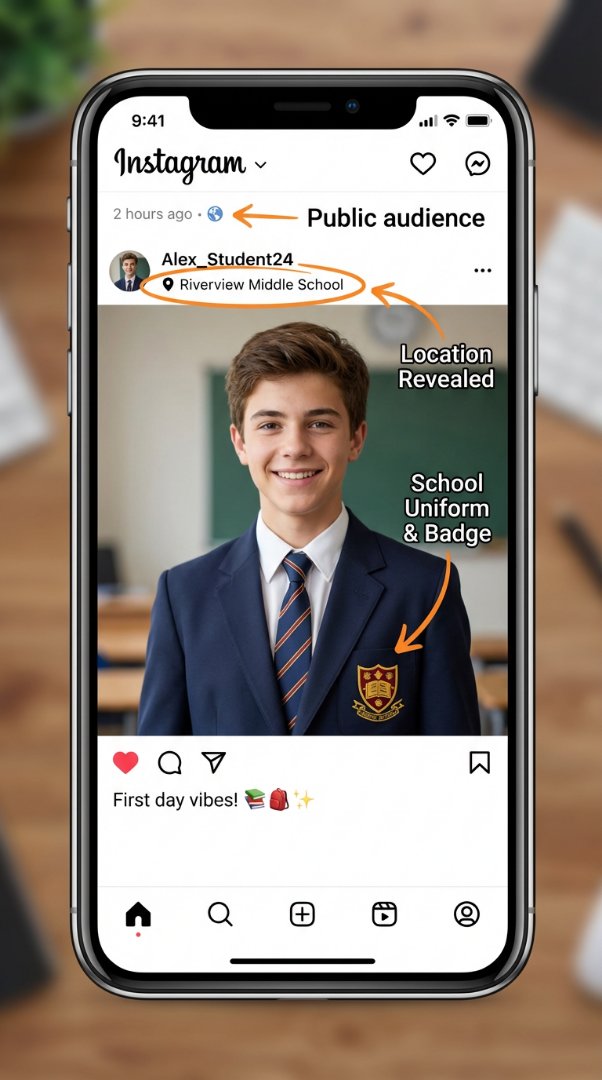
You just posted a "First Day" photo. It seems harmless… but look closer at the details.
📍
LOCATION
Specific school name reveals exactly where you are.
🏷️
IDENTIFIER
School uniform & badge creates a recognizable pattern.
🌍
VISIBILITY
"Public" means anyone in the world can see this.
Level 3
Make Your Move
How would you share?
Choose the safest option
💡 Hide school names, logos, and exact locations before you post.
For Parents
Review privacy settings together▾
Ensure social accounts are private, audiences limited to friends, and location tagging disabled.
Teach "Data Triangulation"▾
Explain how a school uniform + street sign + timestamp combine to reveal exact location.
Check the background▾
Before posting, zoom in to check for visible addresses, diplomas, or identifying landmarks.
⚖️ The Law
Schools and regions often have strict photo and safeguarding rules. Publishing identifying information about minors without consent may violate privacy regulations.
Think Before You Click
Keep your school private▾
Never tag your school location or hangouts you visit every day.
Post later, not live▾
Wait until you've left a location before posting photos of it.
Crop out badges & logos▾
Your uniform crest tells strangers exactly where to find you.
Level 4
The Data
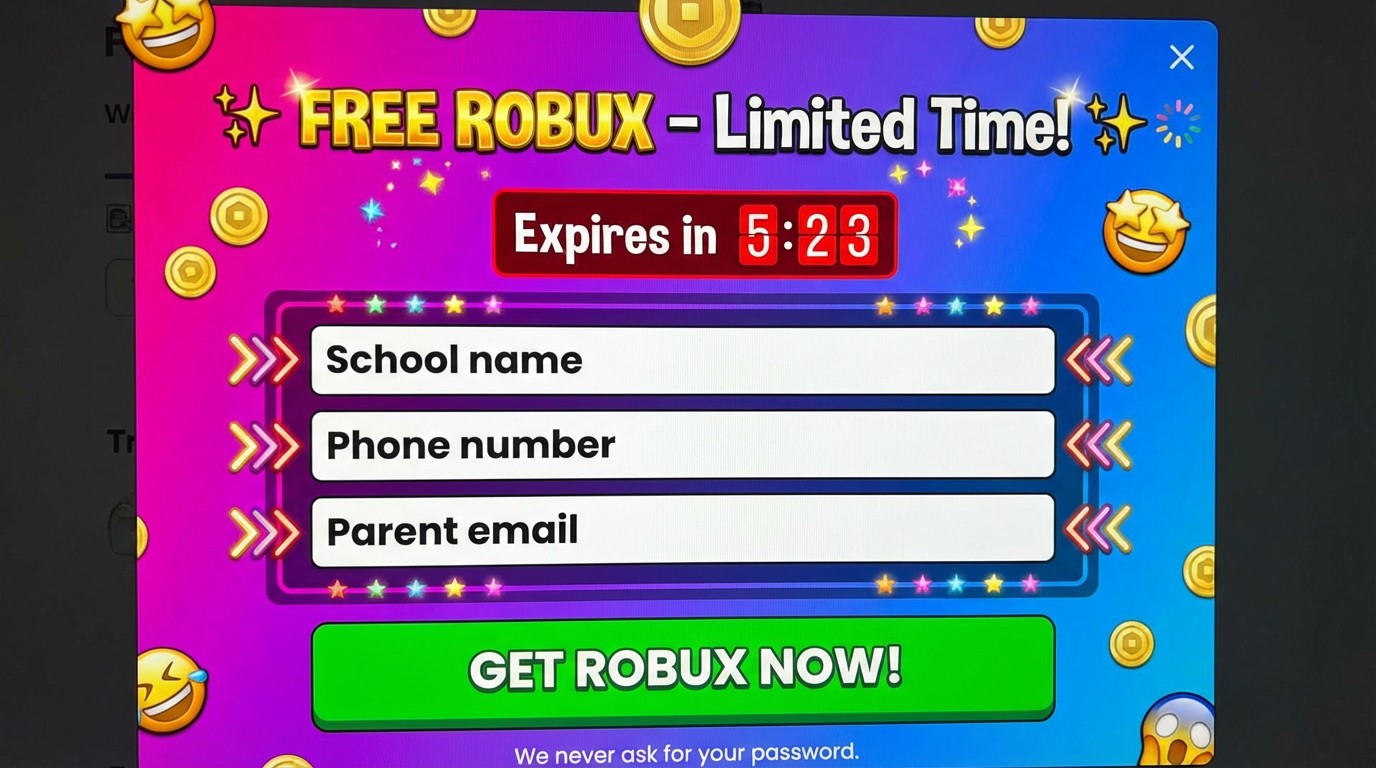
A pop-up appears offering "Free Robux" for a limited time. It asks for personal details to claim your reward.
🎣
LURE
"Free" rewards are often bait to steal data.
🚨
DANGER
Real contests never ask for school or phone numbers.
⏰
PRESSURE
Countdowns force you to act without thinking.
Level 4
The Prize Trap
What would you do?
Choose the safest option
💡 If it's free, your personal data is usually the price you pay.
For Parents
Data is currency▾
Teach children that personal info (school, phone, email) has value and shouldn't be traded for "free" rewards.
Rehearse refusal scripts▾
Practice saying "No" to forms asking for unnecessary details. If a game asks for a phone number, the answer is "Why?" then "No."
Use protective tools▾
Install ad-blockers and configure browser settings to limit tracking and block known scam sites.
⚖️ The Law
Jurisdictions like the US (COPPA) or EU (GDPR-K) protect children's data. Collecting personal info from minors without verified parental consent is often illegal.
Think Before You Click
Real rewards aren't "free"▾
Legitimate contests won't ask for your school address or mom's phone number.
You are the prize▾
If a website offers something huge for free, they're usually selling your data to strangers.
Close, don't fill▾
If a pop-up asks for info, close the whole window. Don't type anything — not even a fake name.
Level 5
The Request
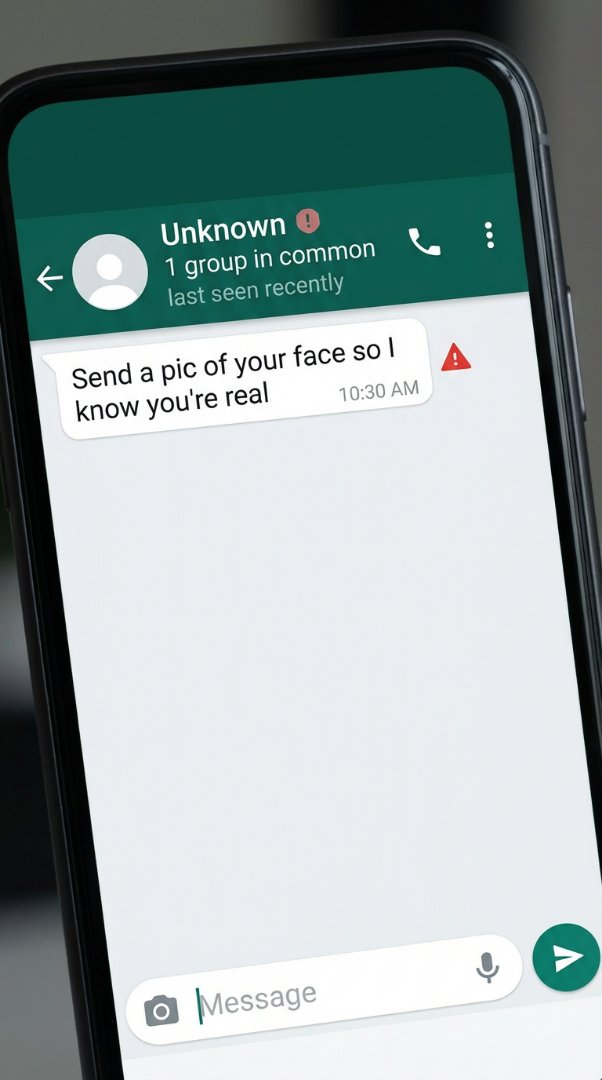
A message came asking for a photo to "prove you're real." Look at the warning signs…
👤
UNKNOWN
No profile photo or name.
📸
DEMAND
Asking for pics is a red flag.
🎭
TRICK
"Prove it" is manipulation.
Level 5
Make Your Move
What would you do?
Choose the safest option
💡 No real friend needs a photo to "prove" who you are.
For Parents
Normalize saying "No"▾
Let your child know it's always okay to refuse sharing photos, even if someone pressures them.
Explain photo permanence▾
Once a photo is sent, you lose control. It can be saved, shared, or used in ways you never intended.
Create a safety phrase▾
Agree on a code word your child can use if they feel pressured online, so you can step in quickly.
⚖️ The Law
Soliciting images from minors is a serious criminal offense in most jurisdictions. Keep evidence and report any such requests to authorities immediately.
Think Before You Click
Real friends don't demand photos▾
Anyone who needs a photo to "prove" who you are is probably not who they claim to be.
Block and report▾
If someone asks for photos, block them immediately and tell an adult you trust.
You're never rude for saying No▾
Your safety is more important than being polite to a stranger on the internet.
Level 6
The Group
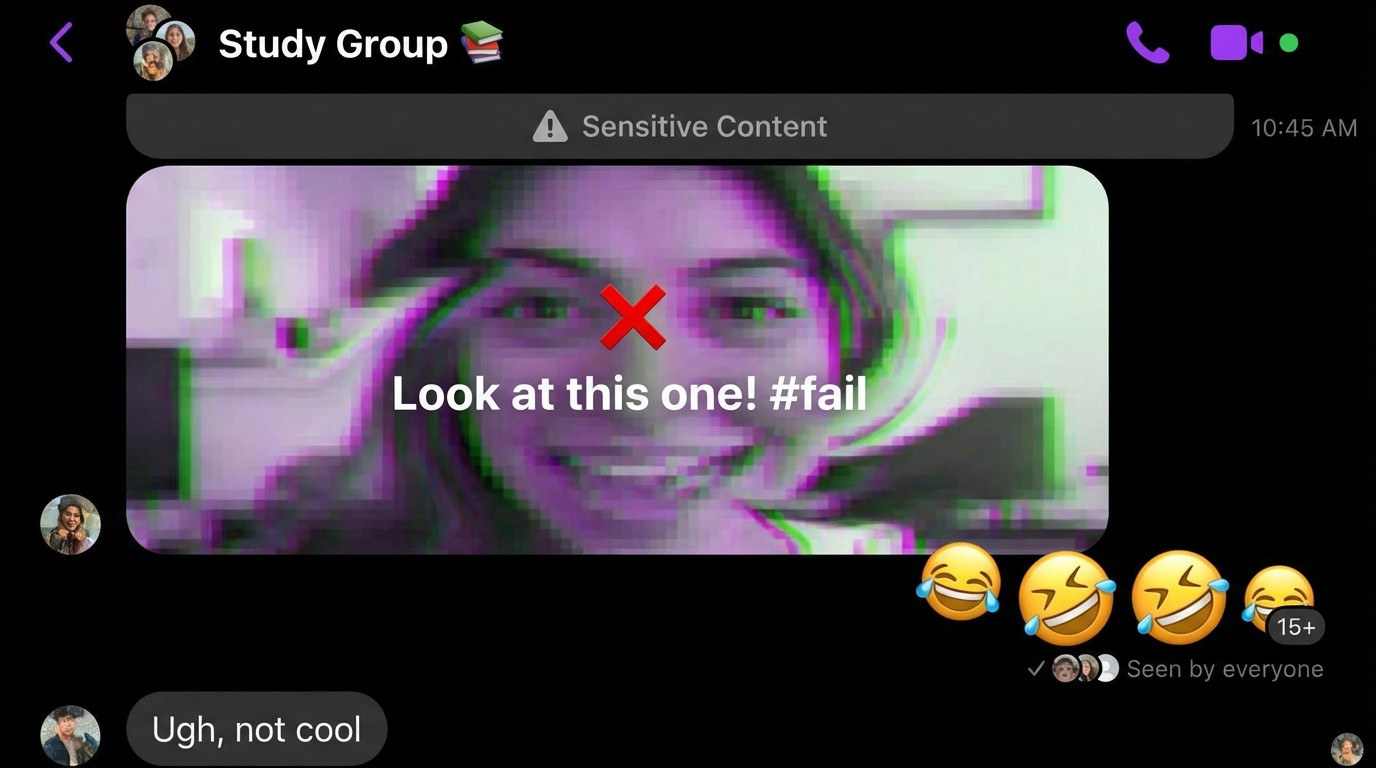
A group chat starts sharing a manipulated photo of a classmate. Everyone is laughing. The pressure is on to join in…
📤
IMPACT
Forwarding spreads the hurt further.
💔
HARM
Manipulated images are a form of bullying.
😂
PRESSURE
Laughing emojis normalize cruelty.
Level 6
Make Your Move
What would you do?
Choose the safest option
💡 Be the hero who stops the chain. Sharing hurtful content makes you part of the problem.
For Parents
Coach on Reporting Tools▾
Show your child exactly where the "Report" and "Block" buttons are in their favorite apps.
Capture Evidence▾
Teach them to screenshot harmful content immediately, before it gets deleted.
Escalate When Necessary▾
Don't hesitate to contact school administrators or platform safety teams if harassment persists.
⚖️ The Law
Harassment, cyberstalking, non-consensual image sharing, and harmful deepfakes often violate school codes and may breach local criminal laws.
Think Before You Click
Don't Forward It▾
If you share a mean post, you become part of the problem. Be the one who breaks the chain.
Report & Support▾
Use the report button. It's not "snitching" — it's protecting someone from being hurt.
Save Proof▾
Screenshot anything dangerous, then block the bully and tell an adult.
Level 7
Game Spending
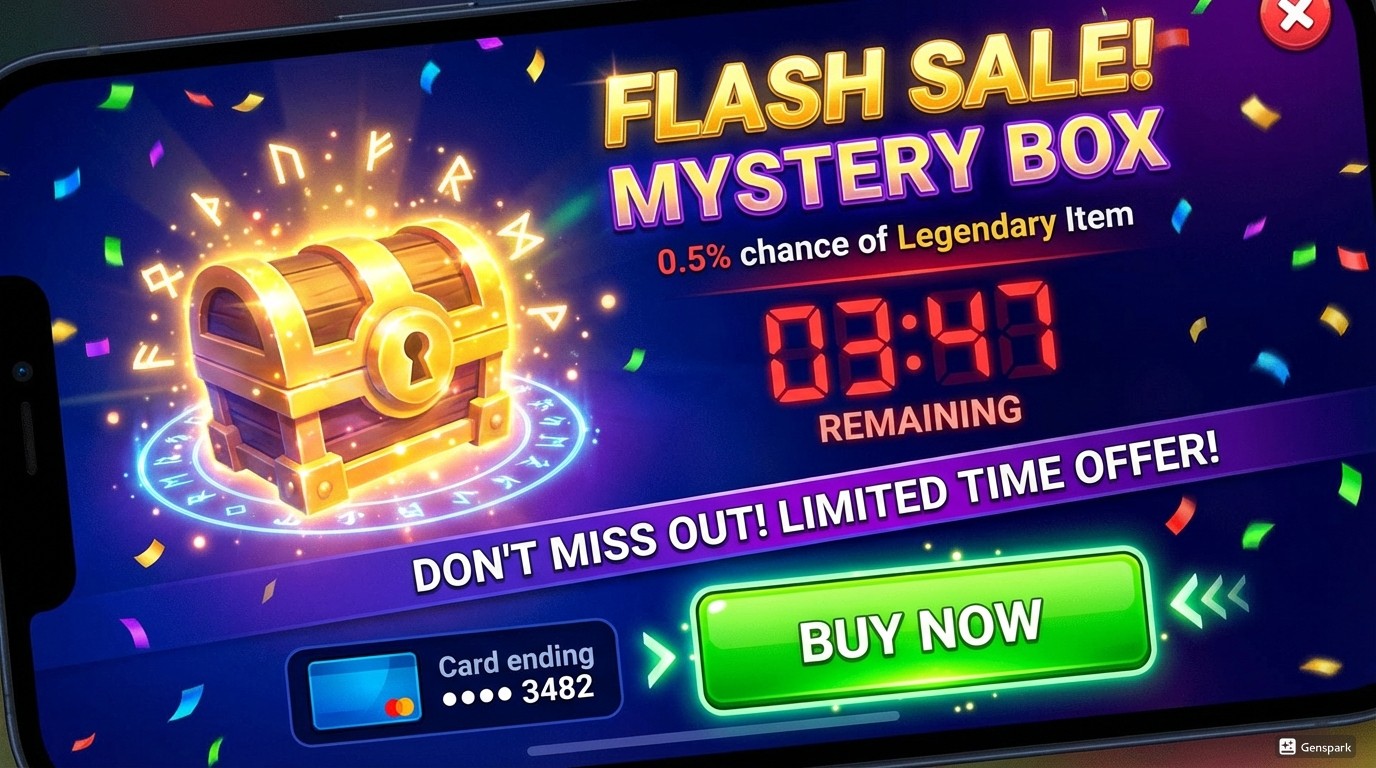
A "Flash Sale" appears in the game store. A shiny Mystery Box promises rare items, but the timer is ticking down fast. What elements are trying to trick you?
⏱️
PRESSURE
"Flash Sale" timers create artificial panic.
🎰
RISK
0.5% chance means you almost always lose.
💳
TRAP
Saved cards make spending too easy.
Level 7
Make Your Move
What would you do?
Choose the safest option
💡 Countdowns and "saved cards" bypass your brain's pause button.
For Parents
Control the flow▾
Turn off in-app purchases by default or require password approval for every transaction.
Discuss the odds▾
Explain that "0.5% chance" means you'll likely lose 199 times before winning once.
Watch for "Sunk Cost"▾
Teach kids that spending more money won't fix a bad purchase or guarantee a win.
⚖️ The Law
Some regions regulate loot boxes as gambling and ban deceptive "dark patterns." Parental controls are a legal tool for valid consent over digital spending.
Think Before You Click
It's basically gambling▾
Mystery boxes are designed to take your money, not give you prizes.
Timers are tricks▾
Countdowns try to rush your brain so you don't think about the cost.
Pause and ask▾
If a game asks for money, stop playing and ask a parent first.